
Donut widget
Show what one metric is made of, as a ring of slices with the Total in the centre.
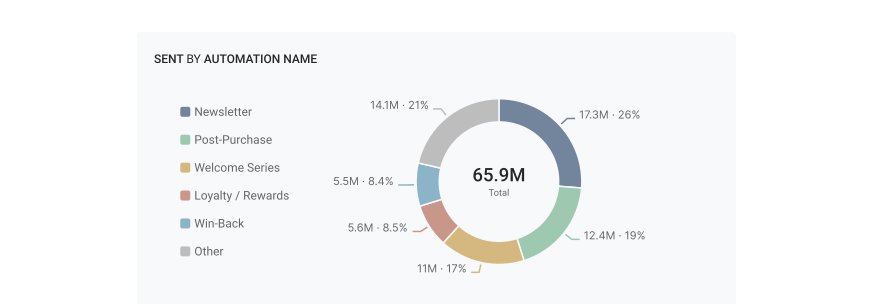
The new Donut widget divides one metric into groups and shows the share of each group. For example, it shows each automation’s share of all sent email.
A new Breakdown category
The widget gallery has a new Breakdown category. It holds the Donut and the List, which moves there from Details.
Metrics that add up
A donut shows only metrics whose groups add up to the Total, such as Sent or Revenue. Rates and averages do not add up, so the Metric list does not show them.
The top 5 and Other
The 5 largest groups each get a slice. The other groups go into one slice, Other, which is always last and grey. Point to Other to see the groups in it.
Compare with an earlier period
When the dashboard has a comparison period, the centre shows the change of the Total. The tooltip shows the change of each slice.
The Donut widget is available to everyone. Donut widget tells you when to use a donut and how to set it up.